Customer display
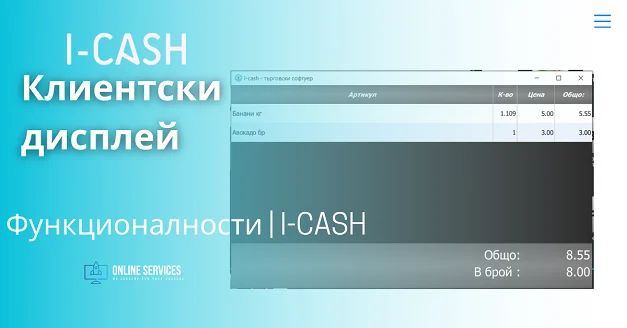

Customer display
I-Cash can offer two options for using a customer display.
I option
Operating system— Windows OC
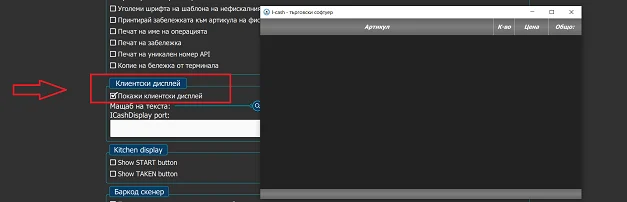
Hardware – a second monitor and a graphics card supporting multiple displays. Navigate to Settings – General – Show customer display.
II option
Windows / Android
Install the application Icash Display on the device that will show the customer display. Both apps must be on the same network.
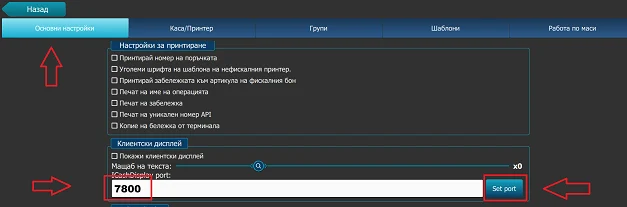
Start the quick sales module and navigate to Settings – General. Set a port in the range 7000 to 9000.
Launch the app Icash Display on the other device.
Please view our guide at this address
Also visit our channel on YouTube.
Your accounts, invoices and payments. In one place. View incoming funds, prepare supplier payments and accept payments via link or QR code, directly in I‑CASH with IRIS Solutions. Register your interest now! Open Banking package for 5 € per month. Up to 0.4% per payment received with IRIS Pay. Unlimited supplier payments. Open Banking package…
We are pleased to announce that I-CASH retail software now offers a non-SUPTO version. This is possible thanks to amendments and supplements to: the Value Added Tax Act, amended and supplemented in State Gazette No. 104 of 8.12.2020, Article 118 (18) (New – SG No. 24 of 2018, amended – SG No. 104 of 2020, effective from…
Under the latest amendments to the VAT Act, fiscal receipts must show a separate line for excise duty paid, in addition to VAT paid (Article 26(2) and (3) of the VAT Act). This initially applied to fuel retailers, but today every retailer of excisable goods must state…
The POS transfer functionality was developed for customers who are engaged in freight trade, but it can be used by any other customer. To start a transfer from the quick sales module you must have access enabled. Note! If you do not see the button from the menu, you have most likely paid for a package in which this one…
How to receive a delivery with currency conversion? Retailers often need to receive imported goods into the warehouse whose accompanying documents show prices in a currency other than the lev. Under Bulgarian law, all documents must be recorded in a single currency (BGN), which is why I-Cash works in leva. This article is for…
I-CASH is a complete solution for managing sales, deliveries, inventory and other key business processes. To make your work as managers easier, we have added a new feature: automatic product purchase orders to the latest supplier. How does the automatic order work? The automatic order in I-CASH analyzes the quantity of an item sold over a given period and allows…