Purchases with currency conversion

How to create a delivery with currency conversion?
Retailers often receive imported goods whose accompanying documents state prices in currencies other than BGN. Bulgarian law requires all documents to be recorded in a single currency (BGN), which is why I-Cash works in leva. This article is for customers whose partners are outside Bulgaria.
If you want to use the feature that automatically calculates prices in BGN, we need to configure a few settings.
- Creating a currency: Navigate to Settings–> Basic–> Currencies (this menu is available only to certain users; contact our staff if you do not have access).
- Select a currency and enter its exchange rate against BGN.
- Save.
- Navigate to Settings–> System and activate the “Currencies” menu (this menu is available only to certain users. If you do not have access, please contact our team).
- Then open a new delivery.
- Check the purchase VAT (see image).
- Select the desired currency (see image).
- Enter prices (see image).
- The system automatically recalculates prices in leva using the specified exchange rate.
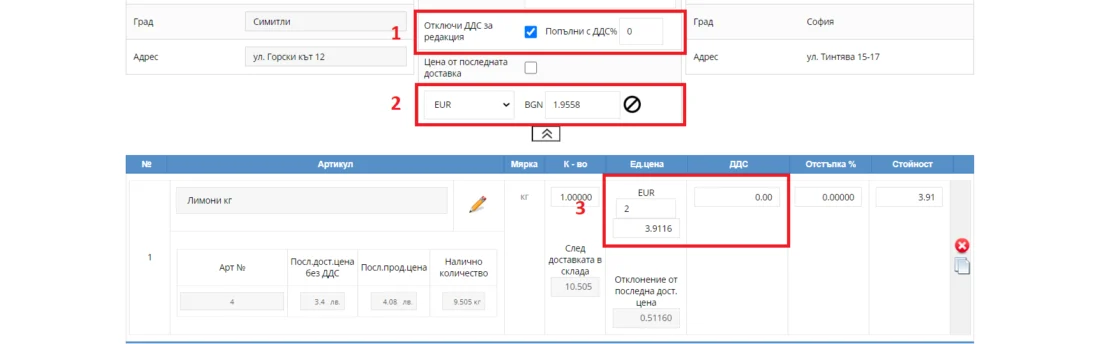
Note: If the supplier details are entered incorrectly, some fields will be inactive or hidden.
Note: For deliveries with currency conversion, the exchange rate is constant. If using a currency with a floating rate, change the rate in the Currencies menu.
Everything you need to know about receiving stock in I-CASH – read the article
You can browse our guide on the website or visit our channel on YouTube.
If your company exports and sells goods outside the Republic of Bulgaria and needs additional transaction documents, please contact our team. We will prepare a custom document based on your criteria or a template you provide.
You can find information about preparing custom document templates in our website's blog section, or contact our team at the phone numbers or email address provided.