Working with Glovo, Takeaway and other food delivery platforms
Do you know how to record your sales when partnering with them? How does I-CASH handle these transactions?
Do you own a restaurant or another food service business? Do you partner with food delivery platforms such as Takeaway and Glovo? Do you know when to issue a fiscal receipt and how to track your sales?
Measures intended to prevent the spread of COVID-19 have made food delivery platforms such as Takeaway and Glovo an accessible, preferred alternative to the traditional restaurant business.
Today's article explains both the sales reporting method and how I-CASH handles this type of workflow.

Legal rules for issuing fiscal receipts when partnering with a food delivery platform
Making a sale through a food delivery platform is a mobile distribution sales operation. The legal procedure for reporting these sales is set out in Article 25, paragraph 2 of Ordinance N-18, namely:
Article 25, (2)
For mobile distribution sales, the fiscal receipt is issued by the person under Article 3, the taxable seller, and handed to the delivery person, who gives it to the buyer upon payment, unless payment for the sale is registered and reported through a fiscal device at the place where the goods or service are delivered.
Under the ordinance, the restaurant operator is generally required to issue a fiscal receipt and give it to the delivery person with the order, even before the customer has paid.
The transaction is paid by bank transfer under the agreement between the restaurant and the food delivery company.
How does I-CASH handle a sale made through a food delivery platform?
I-CASH is retail and inventory software and aims to meet every business owner's needs. Mobile distribution sales are no exception.
If you work with a food delivery platform, notify our staff at support@icash.bg , to have an additional payment method configured for you.
Configuring and activating an additional payment method is necessary to track sales from the particular food delivery platform and issue fiscal receipts according to the Ordinance N-18 requirements mentioned above.
Configuring an additional payment method
Here is how a new payment method is configured by our team:
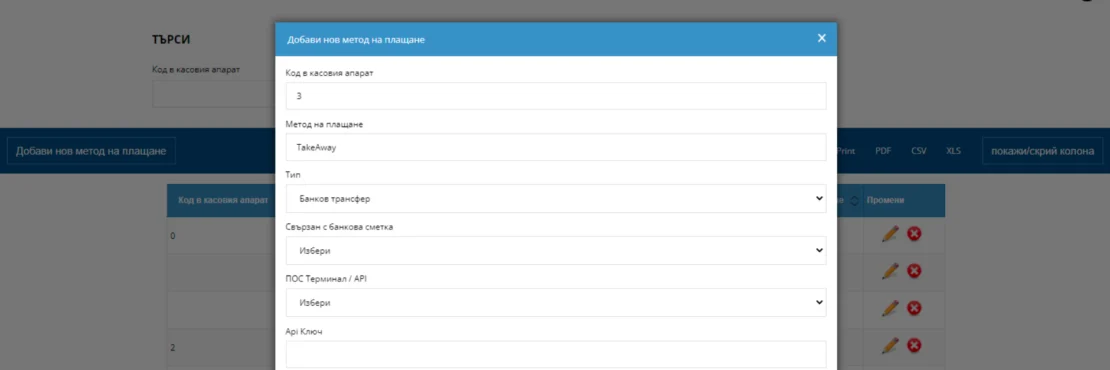
This dialog box is used to enter a new payment method.
- Cash register code – This code allows I-CASH to instruct the cash register to print a fiscal receipt. The code is entered individually, according to the payment methods already configured on the cash register.
- Payment method— Each client chooses the name of the payment method. This is how it will appear in I-CASH. We suggest matching it to the name of the food delivery company, for example “Takeaway”.
- Type– Bank transfer: Set the type to 'Bank transfer' when configuring this payment method. It is then displayed only in I-CASH.
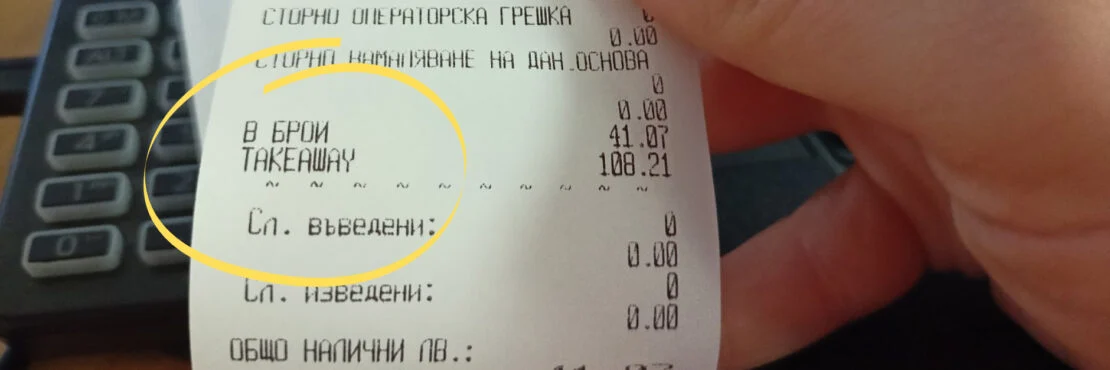
If you wish to configure this payment method on the cash register as well, you must contact the service company maintaining your cash register. This payment method will then appear on the customer's receipt (e.g. – Takeaway).
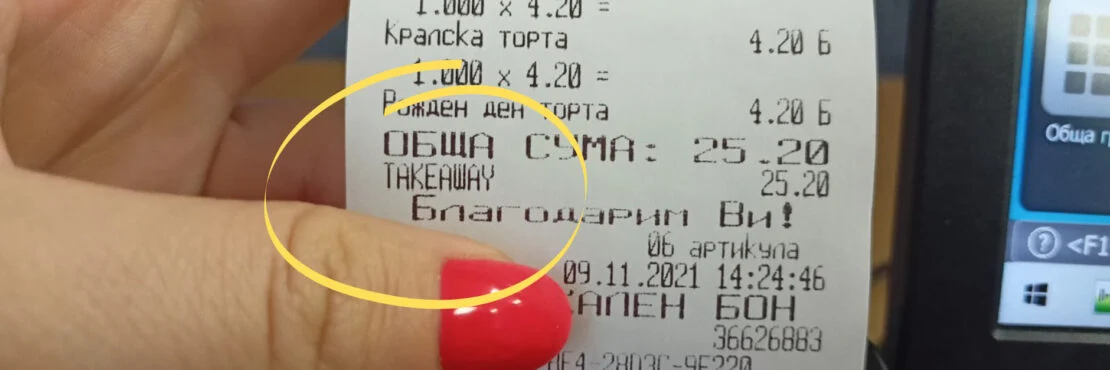
We recommend completing this payment method setup step as well, since it lets you easily track in your fiscal device reports the revenue from sales made through this food delivery platform.
After configuration, the customer must activate this additional payment method in the quick sales module.
This way, whenever a sale uses the Takeaway payment method, I-CASH sends a command to the cash register to print a fiscal receipt.
Activating an additional payment method
Our team handles configuration, but you must activate the additional payment method yourself in the quick sales module (POS).

This can only be done by a user authorized to change the inventory account's quick sales module (POS) settings.
A manager user has this permission by default, but it can also be activated for other user types. More detailed information is available in our article: “ User roles ", and this role is called "POS Administrator".
Activate the additional payment method under Menu – Settings in the quick sales module.
Follow the entire process in our video guide:
If you have not used retail and inventory software before but are interested in a solution that can improve your business management, I-CASH is for you!
By registering, you receive one month of completely free access to I-CASH retail software.
If you have further questions, please contact our staff on (+359) 2 960 7123