How to prepare a template for non-fiscal printers?
Template settings
1. Additional settings
Access additional settings after selecting the printer under Cash register/Printer in Settings:
Fields and information:
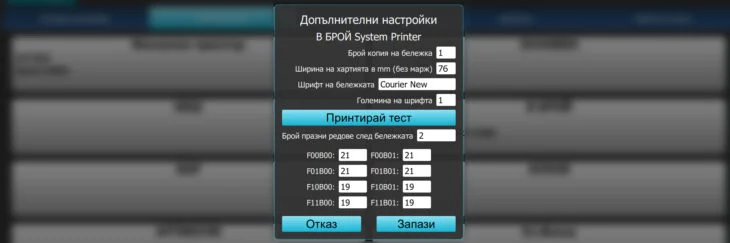
Copies: the entered number determines copies printed by the non-fiscal printer.
Paper width in mm: Inenter the print area. This field is linked and with the image used as the template logo. Onexample of for a 58 mm printer, the area is 50 with a margin of 4 on the left and right– for each printer has a different print area depending on the margins, which areis set from the printer drivers, or Printing preferences if using the Windows driver.
Font – all must be monospace, if fonts are not displayed, install/add them in windows
Font size – the default is “0“ (corresponding to font-size=10) and displays well on an 80 mm printer. The field also accepts negative values.
Characters per line can be checked by printing the printer information. Most ESC/POS printers offer four font sizes (regular ; bold), bringing the total to eight. Count the characters per line and enter them in the fields.
2. Preparing the template
Step 1: Prepare the entire template left-aligned
Step 2: enter size, bold and italic settings
Step 3: then choose alignment, if required
Step 4: Finally, select the section to repeat in a loop
Step 5: Save
How do templates work?
You can choose a station for each item group; a station means the non-fiscal printer to which information will be sent. One item group cannot be linked to two printers to print two slips on two different thermal printers. You can issue a duplicate of the slip or print several copies. Of course, you can enter items from different groups, and the program will print two slips on two different printers, one in the kitchen and the other at the bar.
If two item groups, 'Cold drinks' and 'Hot drinks', are assigned to the 'Bar' station, selecting items from both and pressing 'Send to printer' produces two slips: one with items from the first group and another with items from the second.
If you want to combine everything on one slip, we need to prepare the product catalog slightly differently. First, edit these two item groups and remove their departments. This way, selecting an item from them will not send information to the printer or print a slip.
Next, create a third item group, which we can simply call 'Drinks'. Link this group to the 'Bar' station as well. Then edit all items in 'Cold drinks' and 'Hot drinks' and, under additional details, also select the 'Drinks' group just created. Each item will then belong to two groups. This makes all bar items appear on a single slip.
Note: This approach to preparing the item database negatively affects reports by station.
For convenience, hide the 'Drinks' group in the quick sales module settings. Although this example concerns restaurants, it works reliably and can also be applied in other retail sectors.
Non-fiscal printers are used similarly by companies whose warehouse is next to their sales area, sending warehouse staff information to prepare and assemble orders. In this setup, the non-fiscal printer must be connected over a network. USB cables are not recommended for connecting devices over long distances.
Non-fiscal printers have a wide range of uses, and I-Cash customers use them in many different ways. You can prepare various documents for printing alongside the main sales document. This feature is used primarily in mobile sales to issue warranty cards and dispatch notes. It is also available in the Web application, where it is much more flexible and convenient to use.
Note:
If it prints characters other than those expected:
—check the printing speed; if connected through a COM port, please contact a service technician.
– the printer does not support Cyrillic; please contact a service technician.
– you can connect the printer as a system printer.
– some features work differently depending on whether the printer is connected through a COM port or as a system printer. This depends entirely on the printer model and its driver.
List of all variables and their purpose
Sample templates: