Additional peripheral device settings
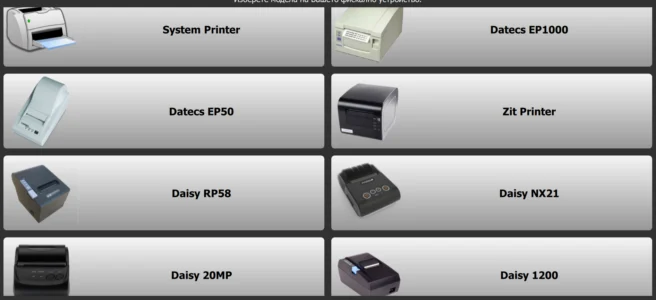
Selecting a printer from the non-fiscal printer list requires no configuration: its settings are already in the program. See the image below. You can see the speeds and encoding configured for these printers here.
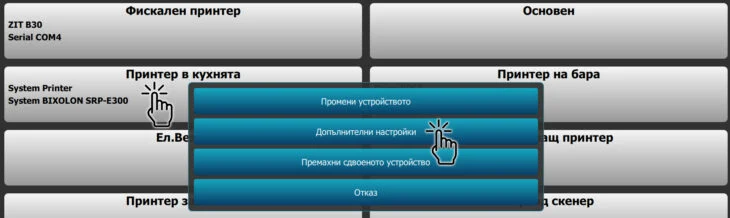
If your printer is not on this list, it must be configured. After completing the wizard and connecting it as a system printer, click the station to open the additional options window:
From the menu, you can:
Change the device
Enter the additional settings menu
Remove the paired device
Cancel the selection
Select the Additional settings menu.
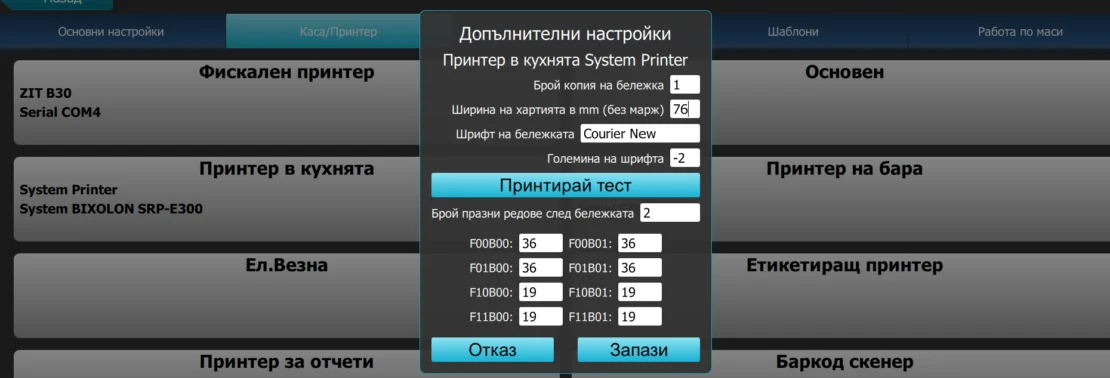
Additional settings menu:
Receipt copies: entering 1 makes the printer print one copy of the receipt.
Paper width in mm: the entered value is the paper width minus the left and right margins. It differs by printer and is usually controlled by the printer driver.
Receipt font: displays a list of all monospace fonts installed on the computer. You must select a font that supports Cyrillic.
Font size: defaults to 10pt if the field is left blank
Blank lines after receipt: advances the paper by the specified number of blank lines
The next eight fields specify characters per line for each font size. To complete them, print the printer's information, manually count the characters per line and enter the values.
When finished, select 'Save'.

What is a weight-embedded barcode, and how does it differ from a regular barcode? Barcodes have been used in the United States since the 1970s and are now an integral part of commerce. Many different types exist, but EAN-13 is the most commonly used in Bulgaria. A standard EAN-13 has the following structure: The first three digits—the country code (380 for Bulgaria)….
We will divide master data entry, or item creation, into two approaches and discuss each separately, covering particular situations and how to prepare for them. First, we will discuss items used at the bar, then goods used in the kitchen, and separately what happens to items used…
Issuing a credit note and processing a return after fulfillment. You make a sale with fulfillment, but the customer returns the goods or the document's prices need to be changed. You need to process a return against the sale and issue a credit note for the invoice. How is this done? Return against a final invoice with fulfillment. If…
How do you send interface commands from a computer to the cash register/printer? Fiscal Printer mode To establish communication between a cash register/printer and a computer, you must enter a specific mode on the fiscal device. Each manufacturer requires different settings to establish the connection. This operation is described in detail in the manual for…

I-CASH is a complete solution for managing sales, deliveries, inventory and other key business processes. To make your work as managers easier, we have added a new feature: automatic product purchase orders to the latest supplier. How does the automatic order work? The automatic order in I-CASH analyzes the quantity of an item sold over a given period and allows…
Want to track your inventory and manage sales easily? I-Cash is a good solution for you. It is convenient to use and lets you enter your items and business partners quickly and easily through import. Importing items Receiving items through import is faster than entering them manually. For…