Personalized corporate cards
How do you prepare personalized corporate loyalty cards in I-Cash?
As a business owner or manager, customer relationships are a core responsibility and an important factor in your company's market position. That is why you constantly ask yourself questions such as:
How to attract new customers? and How to retain existing customers?
There are many ways to attract new customers, and every company has several strategies that work to varying degrees and deliver different results. Loyal customers, on the other hand, are just as important as finding new ones: they keep coming back because they know what they will get from you. They are the people who recommend you to friends and look for new things every time they return.
As a business owner, you often maintain commercial relationships with other companies and, especially, their employees. For these relationships, we at Online Services OOD have developed a new feature: corporate cards. The functionality is based on what we call pricing rules and allows employee cards to be organized and personalized for a specific company using barcodes.
How exactly does this happen?
We prepare cards for a particular company's employees, each containing a code that can be read by a barcode scanner connected to I-Cash. Once this barcode is scanned, the system activates a specific pricing rule. That pricing rule activates the specific price ranges set out in the agreement between you and the company concerned.
- If you will work with more than one company, we recommend using specific, systematically assigned prefixes for each company's cards. This will make generating a consolidated invoice at the end of the reporting period extremely easy.
- If you will work with more than one company, we recommend using clearly defined, systematic prefixes for each company's cards. This makes it extremely easy to generate detailed reports of goods sold by card
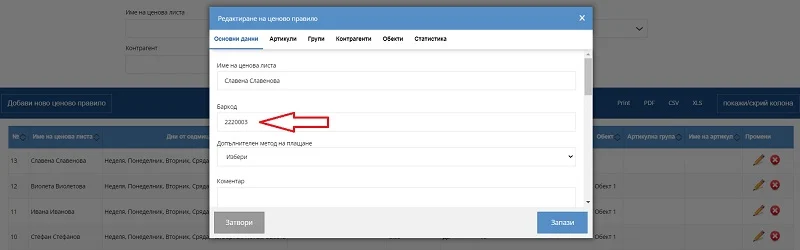
The barcode discussed in this article is entered in the pricing rule
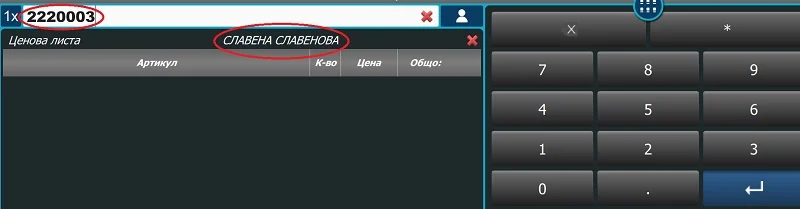
And is selected with a scanner through the quick sales module
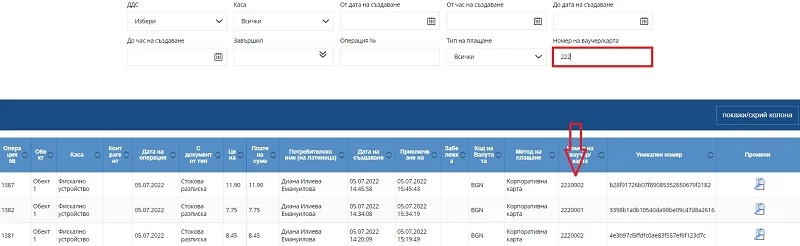
In the consolidated invoice generator or sales lists, enter the company or card prefix so the filter loads only sales with that prefix/card.
You can find barcode generators online or discuss this with the card manufacturer.
Depending on the scanner, this rule can also use a QR code read from a smartphone.