Price lists

Price lists in I-Cash are prepared through the Pricing rules menu. Pricing rules are available in all packages and are included in the price. The system supports several types of pricing rules. The type described in this article is mainly used for wholesale or retail prices, although other applications are possible. The price list is activated by entering a code, which automatically replaces the selling price with the one specified in the pricing rule.
How exactly does this work?
Navigate to Pricing rules and select Add new pricing rule.
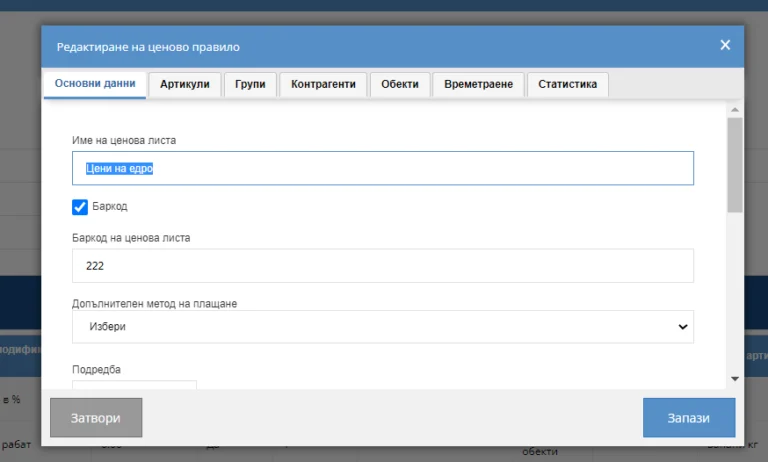
in the first tab, “General details”, fill in
- price list name
- check the barcode marker
- enter the barcode that activates the pricing rule; it must be unique
- enter a consecutive number for priority
- select a price modifier: markup or discount (this field will be removed in the newer program version)
- the modifier is set to 0.00
- enable or disable the pricing rule
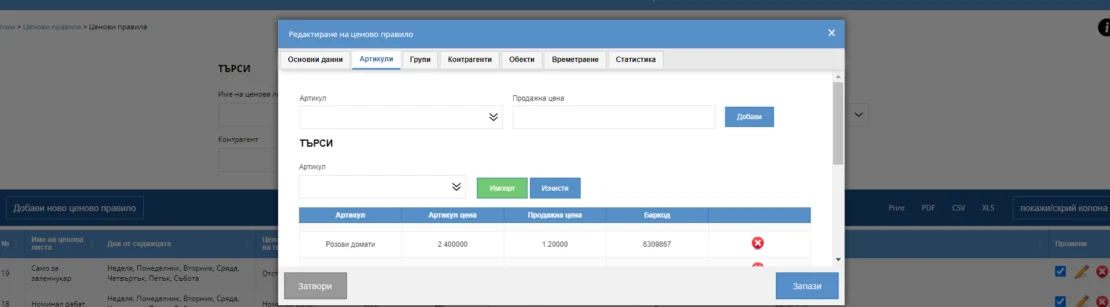
In the second tab, load the items with their specific prices
- manually, item by item
- by import: an Excel file with two columns, barcode and price excluding VAT; a sample file is available
In the Locations tab, select where the pricing rule should be active.
Once the pricing rule is activated, launch the quick sales module and select the dollar-and-arrows icon.
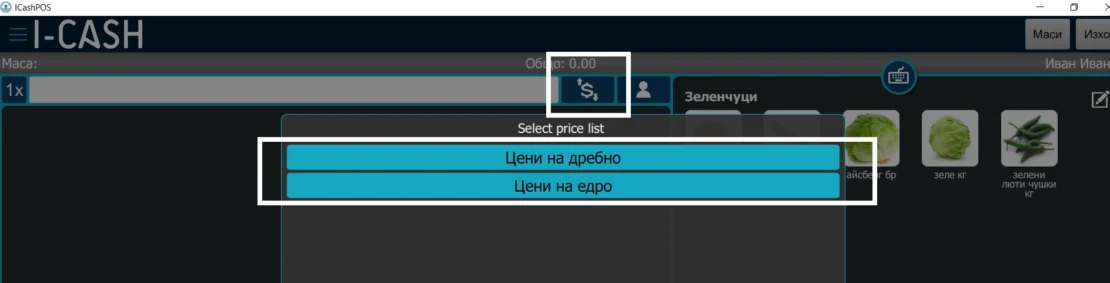
The system displays available price lists. After you select one, the new prices appear beside the relevant items, highlighted in red.
Note: Pricing rules use priorities. You can create an unlimited number, but we recommend combining them. The more rules you create, the greater the chance that they overlap and cancel each other out, meaning they will not work or produce the result you want.
You can find more about pricing rules on our page in blog section.
You can also view a complete guide on the website at this address.