Get three for the price of two

In a growing market, retailers are looking for every possible way to attract new customers and retain existing ones. We continue our customer loyalty series with a new offering: a buy-three-pay-for-two pricing rule. Naturally, I-Cash users can apply it in many different ways. The procedure is as follows: select an item, its quantity and what should happen once that quantity is exceeded. This article provides an example of exactly how this works in I-Cash.
Navigate to Goods –> Pricing rules–> Add a new pricing rule.
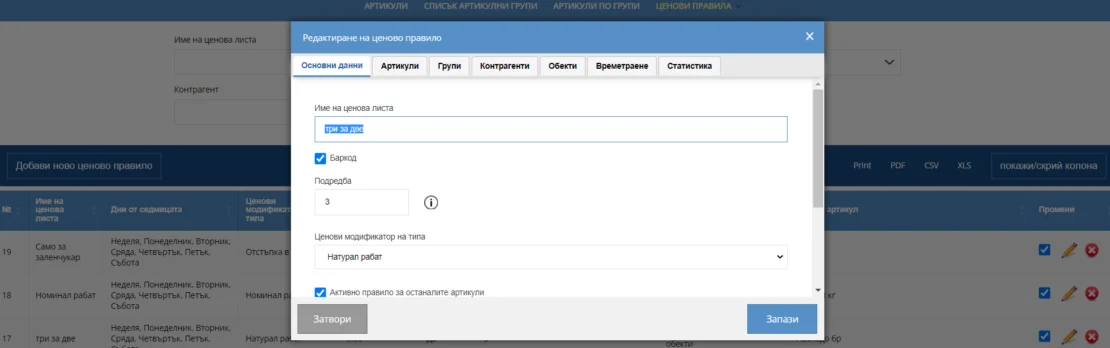
In the Basic details tab
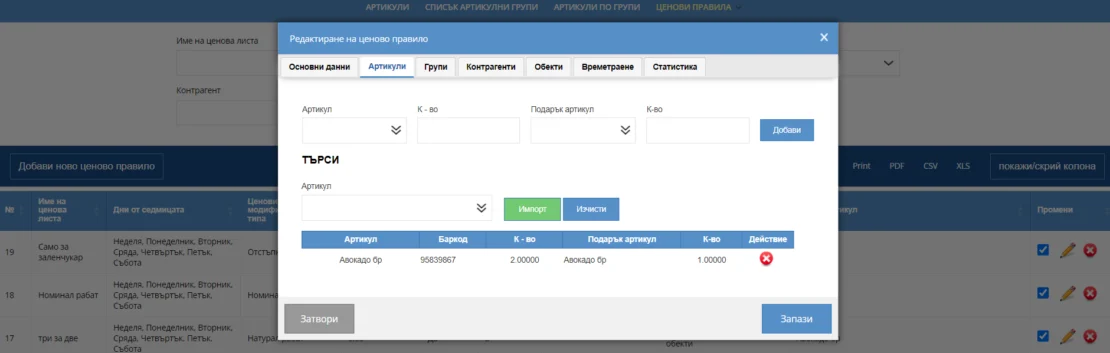
In the Items tab
A sale through the web platform will produce a result like this:
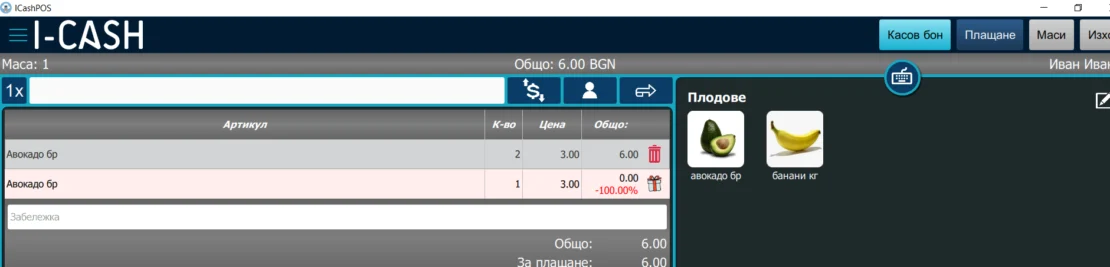
A POS sale will produce the following result:
With these settings, a sale will produce the following result: three units of the product will leave inventory, two at the regular selling price and the third at a zero selling price. Other uses are possible and will emerge in practice. Generic products can be used. A specific discount percentage can be set to achieve a specific price for the gift product. In other words, the gift product does not have to be priced at zero.
Note: The pricing rule also works with recipe items.
Explore the other blog articles related to pricing rules.
You can find a complete guide at this address.
The POS transfer functionality was developed for customers who are engaged in freight trade, but it can be used by any other customer. To start a transfer from the quick sales module you must have access enabled. Note! If you do not see the button from the menu, you have most likely paid for a package in which this one…
Introducing our new Kitchen Display feature, designed for restaurants, bars, fast food outlets, cafés and many other businesses. Kitchen display compatible with Android devices. One of the key features of the I-CASH Kitchen Display is its compatibility with Android devices. This includes TVs with built-in Android as well as TVs connected to an ANDROID TV BOX. This aspect is…
Did you notice that in 2022 an increasing number of supermarket chains introduced self-checkouts in their stores? These innovations are transforming the entire sales model in Bulgaria. Self-service is becoming an accessible and convenient practice for Bulgarian consumers. In today's article, we will explore its benefits for you as the owner of…
Your accounts, invoices and payments. In one place. View incoming funds, prepare supplier payments and accept payments via link or QR code, directly in I‑CASH with IRIS Solutions. Register your interest now! Open Banking package for 5 € per month. Up to 0.4% per payment received with IRIS Pay. Unlimited supplier payments. Open Banking package…
We are pleased to announce that I-CASH retail software now offers a non-SUPTO version. This is possible thanks to amendments and supplements to: the Value Added Tax Act, amended and supplemented in State Gazette No. 104 of 8.12.2020, Article 118 (18) (New – SG No. 24 of 2018, amended – SG No. 104 of 2020, effective from…
Every operation in the software can be entered using a file. The program includes basic file templates. If these do not meet the customer's requirements, they can be modified. Import file templates can be edited under Settings–Imports–Operation import templates….