How to start I-CASH with Windows?
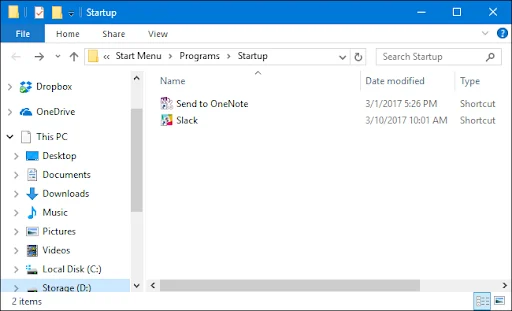
Create a shortcut to IcashPOS, found in the POS folder, and place it in the folder of programs that start automatically with Windows. After restarting the operating system, I-Cash will launch automatically.

Why are there discrepancies in prices and amounts in the documents issued through the program? The Quick Sales module manages the cash register by supporting reporting functionalities. You have the option to report a cashier at the end of a shift from the POS (from the top left menu) by sending this report to the web (the "Send Report" button) and at the same time…
How to connect a Daisy non-fiscal printer. Connecting a non-fiscal printer. First, prepare the master data in the inventory account. Enter your username and password at icash.bg/login and navigate to Settings – Company – Stations. Upon creation, the program generates one main station (non-fiscal printer). Using a restaurant as an example, you can create two…
One feature of retail software is issuing and/or generating invoices. Information about working with invoices is available in the website's blog section. Link to an invoicing article containing basic information on working with invoices. The software provides two invoicing options: issuing an extended fiscal receipt; issuing a fiscal receipt against an invoice number from…
How to prepare your hardware before starting with I-CASH What does the program need for normal operation? The first thing a prospective software user must consider is the minimum hardware requirements. For more information, see here. You can download the quick sales module from the home…
How do we prepare an interim bill in I-Cash? To print an interim bill through the quick sales module, we need to complete several steps. The app must be installed, and a thermal printer must be prepared to produce the result we expect. The first step is activation: in Menu – Settings, select…
There are many articles online about connecting a system printer to Windows. Every newly purchased printer should come with drivers and a manual explaining how to establish the connection. If you use Windows 10, it will offer drivers for the relevant system printer. For retail…