Entering a bill by table
I-Cash includes an additional module developed for businesses in the restaurant sector.
This module is included in the PRO package and provides new features such as:
- table service;
- creating users with unique passwords;
- the ability to connect non-fiscal printers—for more information, see here;
- additional reports.
Module settings:
1. In the web platform, go to Settings – Company details – Rooms. If you do not have access, please call a member of our team. Create rooms such as Winter Terrace, Summer Garden and so on. At least one room must be created.
2. Start the POS and refresh the database. Navigate to Menu – Settings – Table Work.
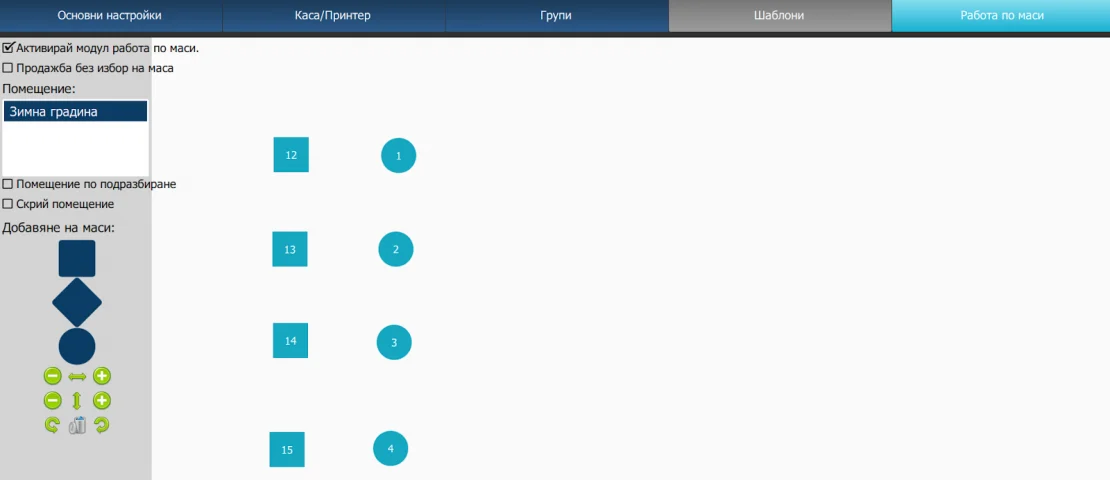
Information
- Enable table service module: the checkbox activates this module.
- Sale without table selection: this checkbox allows a new bill without selecting a table.
- Room: a list of rooms created in the web platform. Clicking the text activates it and turns it blue. You can now make changes by creating and modifying tables.
- Default room: the active room appears when you log into the program.
- Hide room: the active room will not be visualized in the POS and you will not be able to mark the tables in it.
Adding tables in I-Cash
The program allows you to create three types of tables (purely visual differences). Clicking one of them creates a new table in the field on the right. Each new table appears in the same place, so you may end up adding several tables on top of one another. You can move a table by dragging and dropping it: click, drag and release. The program lets you enlarge or shrink the image horizontally and vertically. Every newly created table is named “new table”. To change the name, click the text and it will turn white. After changing the name, confirm with “ENTER”.
What capabilities does the restaurant module provide?
See in the video how to enter orders by table. How do you split a bill and move a bill from one table to another? Please note that each operation can be prohibited or permitted for each individual user.
You can see a summary of everything in this article here.