
Everything you need to know about weight barcodes
What is a weight barcode and how does it differ from a standard barcode?
Barcodes have been used in the USA since the 1970s and are now an integral part of retail. Many types exist, but EAN-13 is most commonly used in Bulgaria.
The structure of the standard EAN-13 is as follows:
The first three digits —the country code (for Bulgaria, this is 380).
Next 4–6 digits – manufacturer code.
The remaining 3–5 digits – the specific item's code.
The last digit —checksum.
This barcode type contains only product and manufacturer information, without quantity or weight.
What is a weight barcode?
Weight barcodes are more specialized because they contain both item information and its quantity (weight). This makes them particularly suitable for products sold by weight, such as meat, cheese, fruit and vegetables.
Example in I-CASH:
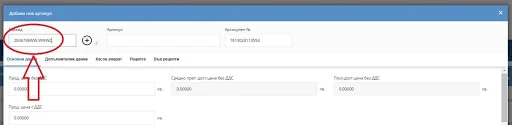
When creating an item in I-CASH, you can enter a pattern in the barcode field such as: 2846736WW.WWWC
A barcode entered this way is recognized as a weight barcode. Set the item's price per kilogram. Purchases are also recorded in kilograms, even though the products physically arrive as individual units.
During a sale, the system automatically reads the quantity from the barcode itself.
For example:
The barcode 2846736004855 means the customer is buying 485 grams of the product.
How is a weight barcode structured?
Information in a weight barcode is arranged as follows:
The first two digits – prefix (I-CASH supports 22, 24, 26, 27, 28 and 29).
The next five digits – manufacturer code.
WW.WWW —the item's quantity (in grams).
C —a checksum confirming that the other digits are correct.
Important: letters entered in the barcode must be uppercase.
How to generate a weight-embedded barcode?
There are many online barcode generators. One example is barcodes.bg.
The steps are simple:
Select the barcode type from a list.
Enter the required details.
Generate the barcode.
You can download and print it.
This is a convenient solution for businesses handling many products.
Barcodes in I-CASH
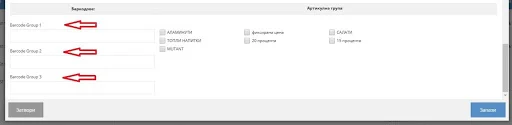
For each item, you can enter several different barcodes.
The same barcode cannot be used for multiple items – the system treats it as a unique identifier.
A weight barcode is extremely useful for stores selling goods by the kilogram. I-CASH automates the process by reading the quantity directly from the barcode, making things easier for retailers and customers alike.