Everything you need to know about invoicing with I-CASH
An invoice is a tax document. Under the Value Added Tax Act (VAT Act), every taxable person supplying goods or services must issue invoices and follow the invoicing rules established by Bulgarian legislation.
Invoices must include mandatory details such as document name; a consecutive ten-digit number uniquely identifying the invoice; issue date; identifying details of the supplier and recipient, such as identification number, name and address; details of the goods or services; the date of the taxable event; information about prices and payments.
Traditionally writing invoices by hand in an invoice book takes time and is prone to errors. That is why it is increasingly relevant to electronic invoicing.
I-CASH is retail software and, as such, offers numerous options for issuing invoices.
I. Why is issuing an invoice through I-CASH easier and safer?
- You can issue the invoice at the time of sale;
- You can generate an invoice for a sale;
- An archive of all invoices you have issued;
- A numbering range is assigned to each invoice, ensuring that each sequential ten-digit number is unique;
- You can provide your customer with an extended fiscal receipt;
- You have a customer directory that stores each business partner's personal details.
- You have an item database storing each item's unique characteristics.
II. Invoice types in I-CASH
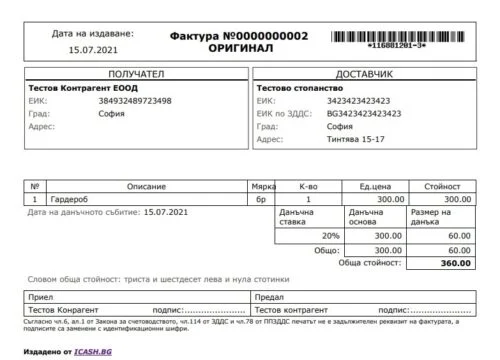
I-CASH includes the main tax documents in this area by default: invoices and invoice notes. They are stored in the Documents menu.
Invoice
Where can you create an invoice?
- WEB:
- At the time of sale;
- Generate for a sale;
- Generate for an advance payment;
POS
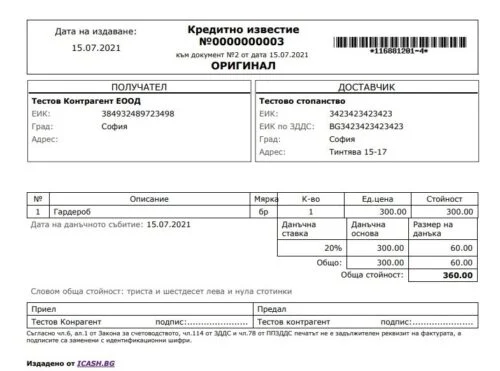
Credit note
Where can you create a credit note?
WEB
- Generated when processing a return against a sale
POS
- Generated when processing a return and selecting the 'Credit note' document type
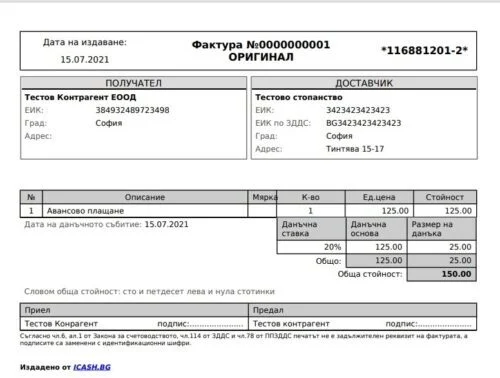
Advance invoice
WEB—time of sale
Pro forma invoice
WEB—time of sale
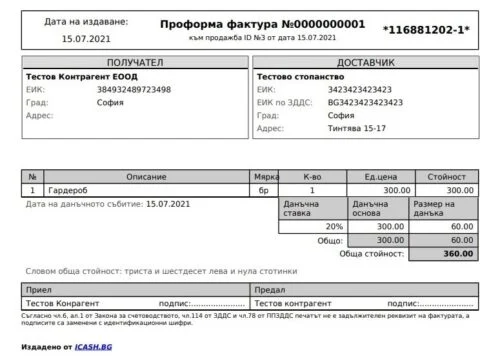
III. Ways to create an invoice with I-CASH
1. Through WEB – menu “Operations”, submenu “Sales”
At the time of sale
I-CASH allows you to create a document at the time of sale. You can read more detailed information about selling with an invoice in our user guide.
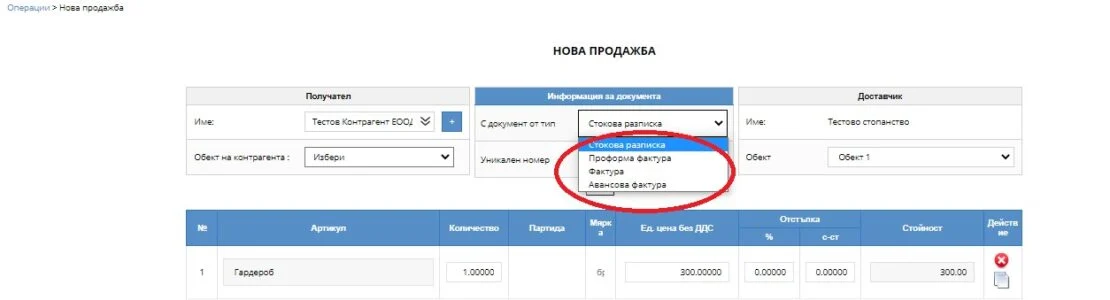
When creating Pro forma invoice after completing the operation and pressing 'Print documents', you generate a document that can be printed or emailed. The sale itself is saved as an open operation that can later be completed with another document type.
When performing advance payment it is important to complete the Advance invoice amount including VAT field. This generates an advance invoice and goods receipt, which do not deduct stock but document the overpayment.
IV. Generating an invoice after creating an operation
Another way to create this tax document is to generate it afterward. You can generate an invoice from an advance invoice or a goods receipt.

Generating an invoice note after an operation
When performing return through WEB, a credit note is generated for each invoiced sale.
2. Through POS—the quick sales module
At the time of sale
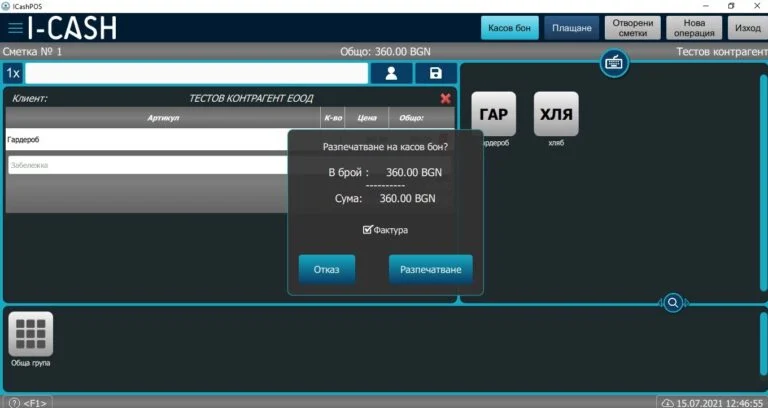
When making a sale in POS, select a business partner. After selecting one, press 'Fiscal receipt' and enable 'Invoice'. You can then print an 'extended fiscal receipt' containing both fiscal receipt details and invoice details.
Generating an invoice note after an operation
The quick sales module lets you generate a credit note against an invoice when processing an end customer's return.
In addition to the customer invoices listed above, I-CASH lets you generate and store supplier invoices. They support your day-to-day business operations and goods management. You can find the supplier invoice list in the “Documents” menu, under “Delivery invoice list”.
V. Default template and document customization
I-Cash lets you customize the default invoice and goods receipt templates by enabling additional fields. Only some of these are enabled by default at registration.
For document type Invoice the following fields can be activated:
Discount, Goods/Service (item type), Note, Accountable person, Location address in notes, Brief tax summary, Customer phone and email, Due date, Payment method, Discounted unit price, Tax group, Unit price including VAT, Total price including VAT, Barcode / additional barcodes.
For document type Goods receipt the following fields can be activated:
Note, Responsible person, Location address in note, Brief tax summary, Customer phone and email, Payment method, Discount, Goods/Service (item type), Unit price before discount, Tax group, Price including/excluding VAT, Item note, Barcode.
If you need specific fields activated, contact us at support@icash.bg.
If you are interested in electronic invoicing or business management through retail software, requestone month's free access to I-CASH retail software by registering at https://icash.bg/bg/
Contact us:
+359 899 991 288;
+359 887 701 224;
support@icash.bg