Interim bill in I-Cash

How to prepare an interim bill in I-Cash?
To print an interim bill through the quick sales module, we need to complete several steps. The app must be installed and a thermal printer prepared to produce the result we expect.
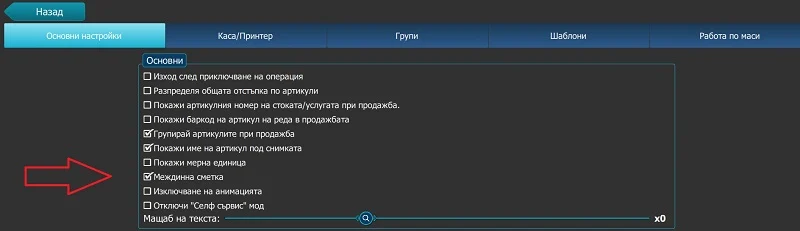
First, activate it: under Menu–Settings, check 'Interim bill'.
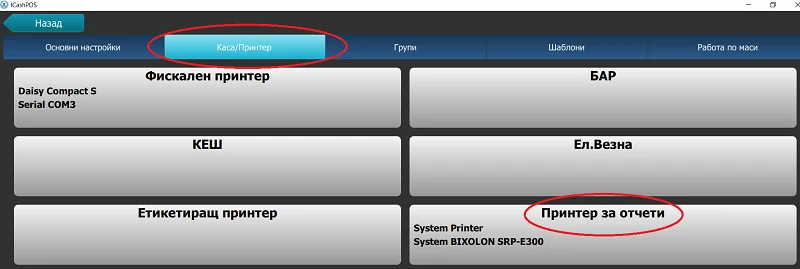
Next, select a printer through the wizard. To do this, go to Menu – Settings – Cash Register/Printer – Report printer.
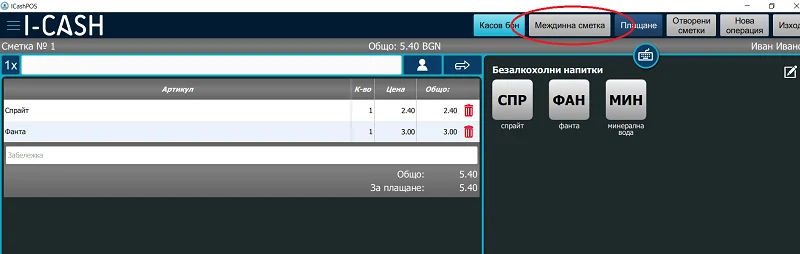
The final step is displaying the bill. When entering items in the restaurant module, an Interim bill button appears on each open bill. Pressing it prints a slip showing all items entered so far, with their quantities and prices. It also shows the date and time, the serving waiter's name and the company details. Everything is totaled at the end of the slip, allowing the customer to check the amount accumulated so far.
Additional information: An interim bill cannot be printed by a fiscal device. It is a document that does not resemble a fiscal receipt or copy its mandatory elements. For this purpose, the software user must have a thermal printer. The software allows one printer to be used for several reports while also printing information slips for the different sections of a restaurant, such as the hot kitchen, cold kitchen and bar. This slip cannot be manipulated by the program user. The printer settings only allow the template layout to be adjusted by setting characters per line and the font size and type. You can find examples of these printers on the website of Daisy Technology.
You can read how to connect the printer to the app in the blog— system printer or additional settings or through a virtual COM port.