
Home / User guide / Import of business partners
Importing business partners
Through the operation "import of business partners" you have the possibility to import the business partners into your warehouse
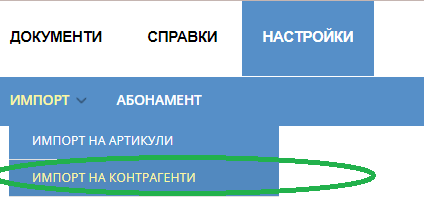
Create a file
To create your file with Counterparts, you need to go to "Settings - Import - Import Counterparts"
There you will find a sample template in which you will fill in the necessary information that you will need in the future for all Suppliers and Customers.


Required columns to fill
The only mandatory columns to fill in for the following:
1. business partner
2. Type of business partner
3. Code
All other columns are additional as information and are filled in as desired:
Number/ barcode
City
Address
EIC
VAT registration
MALL
Bank
IBAN
SWIFT code
Mobile phone
Phone
Fax
E-mail
Internet page
Contact person
No delivery/sale
Consignment/partial payments allowed
Method of identification
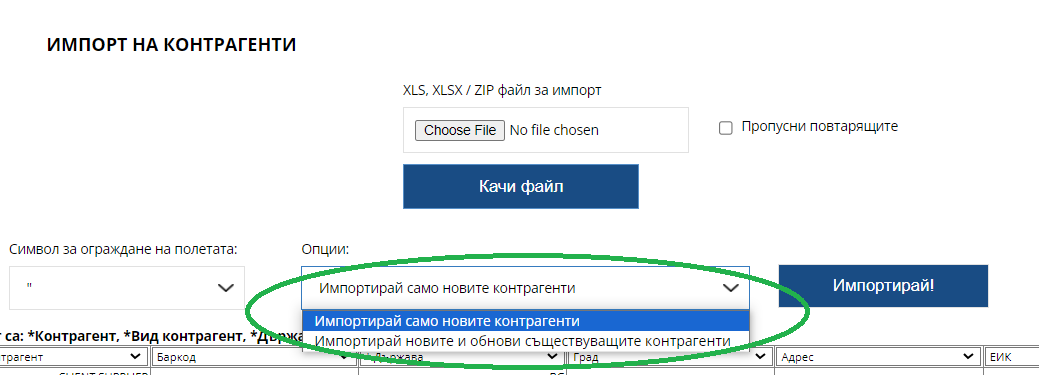
Import process
After loading your file with the necessary information, an option will appear whether to import new items or update old items as information that you have previously created in the system.
You need to choose one of the two options.


Import successful
If the file you import is correct and there is no forgotten information to fill in, it will say "X business partners will be imported into your warehouse"
After the operation, you will find the imported file in "business partners"