Home / User guide / No sync
No synchronization
Who is it applicable to?
It is applicable to customers who will not monitor quantities and prices of the goods they will sell.
It is applicable for customers who will keep track of the documents of the completed orders such as Goods Receipts, Invoices and Credit Notes.
Orders from the online store will be entered with the value and quantity at which they were sold to the end customer as stated in the order.
What's happening in ICash and Woo (Sale, Warehouse, Payment)?
After placing an order in the online store, it will be reflected in ICash with the corresponding status selected by the customer. The status of the item in the online store will remain "Available", even if this quantity is negative in ICash. The item will be available to order until its WooCommerce status changes to Out of Stock or Out of Stock.
How to create a new item?
The system allows a new item to be created by ICash from the goods menu by noting that this item must also be created in the online store or by WooCommerce in editing the specified item by checking the box in the "Online store" folder
If the item is created through the online store, a mandatory SKU number must be added, through which there will be traceability in I-Cash.
Once created, all items will be updated as information only when placing an order through the online store, as the mode of operation is selected "No synchronization"
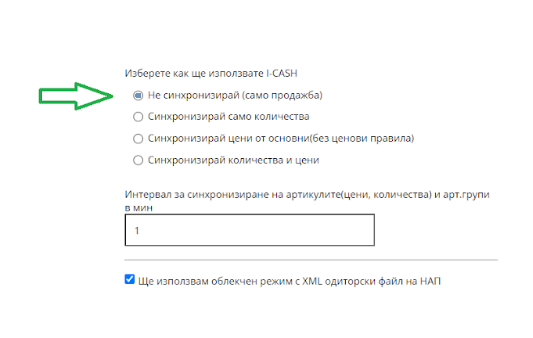
How to set the mode?
On step 1 of the form, we select the first option:
- Do not synchronize (Sale only - Means that there will be a synchronization of the orders, which will include the names with the SKUs of the items and their prices)
Statuses
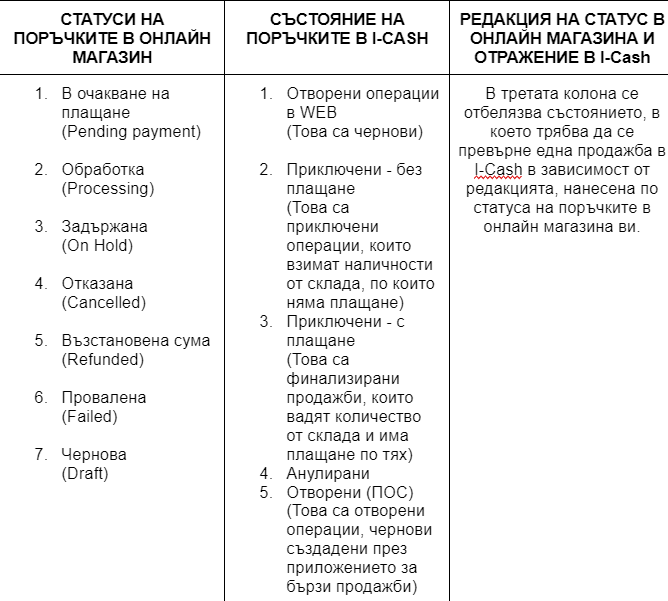
In the second step, the reflection of statuses from the online store in I-Cash is configured.
Each status listed in the online store will correspond to a specific sale status in I-Cash.