
Home / User guide / Price synchronization
Price synchronization
Who is it applicable to?
It is recommended for customers who mainly work with ICash and prepare and edit items from the warehouse software. All pricing information is populated and managed by ICash. This synchronization will not manage quantities, which will result in differences for customers with a warehouse, so it is recommended for customers who do not use a warehouse and do not track the movement of goods. For this purpose, in this synchronization, it is recommended not to check the box for stock management in WooCommerce product settings.
What's happening in ICash and Woo (Sale, Warehouse, Payment)?
After placing an order in the online store, it will be reflected in ICash with the corresponding status selected by the customer. The quantity of the item will be reduced by subtracting the quantity from the order placed. The status of the item in the online store will remain "Available", even if this quantity is negative in ICash. The item will be available to order until its WooCommerce status changes to Out of Stock or Out of Stock.
How to load goods?
The goods are paid for with delivery in ICash, but this is not reflected in the online store. With this synchronization, the movement of goods is not monitored. If a delivery is made in ICash, the quantities of the items will increase in the warehouse, but this will not affect the online store and will not change the status there.
How to create a new item?
The system allows a new item to be created from ICash from the goods menu, noting that this item must also be created in the online store or from WooCommerce in the products menu.
When we create the item in ICash and then transfer it to WooCommerce we need to track its status in the online store. There, this item will be transferred as "Out of Stock".
When we create the item in WooCommerce we need to change its status to Available so that it can be selected when ordering.
How to return goods?
Returns can be made manually through ICash
If the order is completed: as a customer return. The order in question is selected and the goods are returned to the warehouse. You have the option to return only part of the goods or all the goods. You cannot add quantities and new items. A new sale is being prepared for this purpose.
If the order is not closed: edit. When the order is in the status of an open operation in ICash, it can be edited and accordingly finalized after both parties agree on the changes made.
Note: these changes will only affect commercial software.
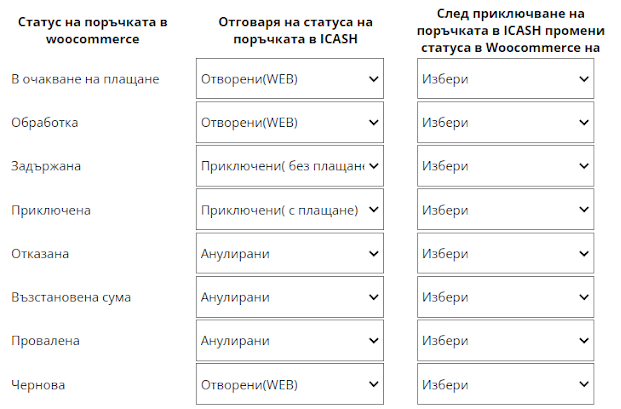
A WooCommerce return can be reflected by a change in the customer's order status. In the example from the picture, when the status of the order is changed to "Rejected", "Refunded" and "Failed" in ICash, a customer return will be generated for the corresponding completed operation, which will return the goods to the warehouse. If we have an invoice for this sale a credit note will be generated.
How to set the mode?
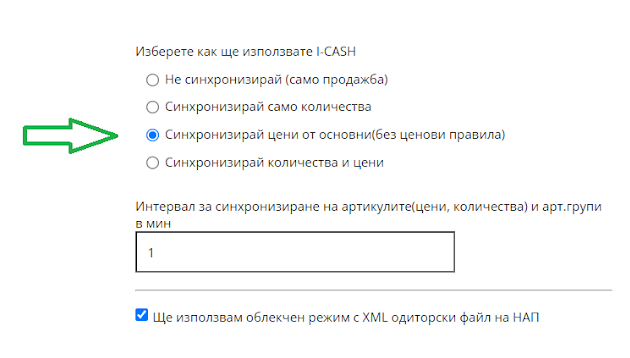
On step 1 of the form, we select the third option.
Promotions
If this method of operation is selected, the prices will be managed by ICash. I.e. the new item price is entered in the Goods = menu> Items => item edit => price edit. We work with final prices. If price rules are prepared in ICash, they will not be reflected in the online store. The change is automatically reflected in the Online Store. This change is not instantaneous, but is determined by the Item, Price, Quantity, and Item Sync Interval. groups (measured in minutes).
If promotions are being prepared in the online store and the WooCommerce prices of the items are changed, this will be a temporary change. After 15 minutes, a krone will pass and flag all changed prices, causing the prices from I-Cash to match those (just changed) from WooCommerce.
For this purpose, a new location can be created in I-Cash and the synchronization can be done in this location. Thus, we will have the opportunity to sell at different prices in the online store and in the physical store. We will have two warehouses with different quantities and prices.
In this case, a plugin can be used that discounts the base prices of WooCommerce products.
Another option is using coupons.