
Home / User guide / Cancel operations
Reversals
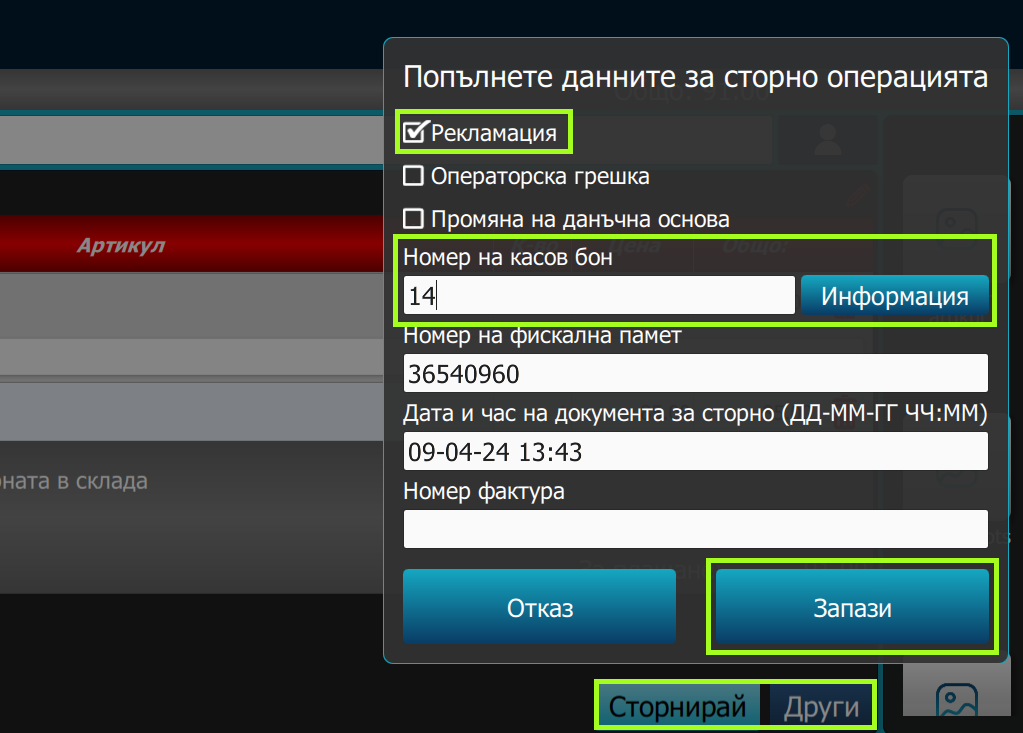
Provides the ability to return a sale from a customer. For this purpose, you need to:
Enter the type of reversal (customer return, operator error, change of tax base).
Enter the number of the voucher you wish to cancel.
Press the "Information" button.
Press the "Save" button.
The system will retrieve and display the sales data stored in your warehouse cloud. Make sure the information is correct and matches the refund you are processing.
Select the sale items to be returned back to the warehouse. For each selected item, you can specify the quantity to be returned.
Select the payment method by which the customer will be refunded. Available payment options may vary depending on your configuration.
If the payment is in cash, press the "Cancel" button. If the payment method is different, press "Other" and the corresponding method.
The system will generate a cancellation receipt, the amount will be deducted from the funds available in the cash register. A new customer return tied to the original sale will be uploaded to your warehouse cloud.