
Home / User guide / List of customer returns
Customer returns
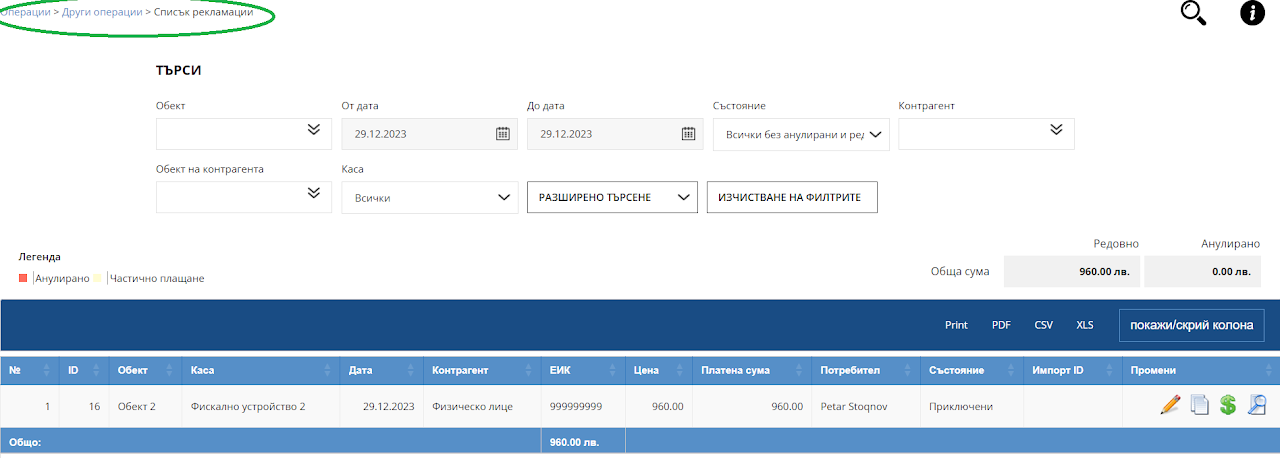
In the customer returns list you will find all sales customer returns created since the creation of your warehouse.
A sales customer return is made only from the "Sales List" where you can create a new customer return using the blue inverted arrow icon.
In a list of customer returns, you can only track already created customer returns, and you can make edits to them if they were created with the payment method "By bank transfer"
customer returns/Cancellations that are created by issuing a fiscal receipt are not subject to corrections.
You can get information in the list using the following search filters:
-location
-From date to date
-Condition
- business partner
- location of the business partner (if you specified such an location when creating a business partner)
-Cash (From which fiscal unit the Cancellation was created)
If you did not add a payment when creating a new customer return, the operation will remain unpaid.
For this purpose, in the list of customer returns, you can use the green dollar icon on the right to add the amount of the performed operation, which will subsequently be reflected in the reports of your warehouse.