
Home / User guide / Receivables and liabilities (detailed report)
Receivables and payables (detailed report)
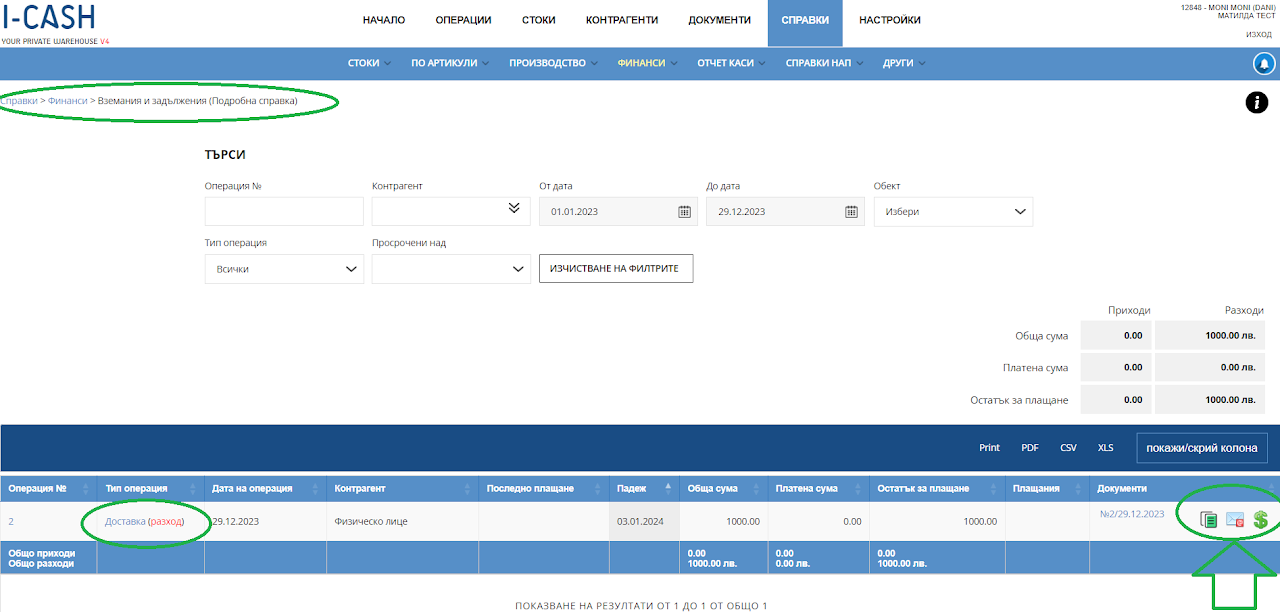
Accounts Receivable and Payables (Detailed report) report is available in reports panel, Finance menu
Receivables and payables
The Accounts Receivable and Accounts Payable report helps you track anything unpaid on documents that you owe on Supplies or are owed to you on Sales.
The report indicates the type of operation, the date and the amount due. It has a report to the issued document.
To the right of each due document, you will find a green dollar icon, through which you can add a payment/surcharge on the operation. After full payment of the amount due, the obligation to the Customer/Supplier will be removed from the list.
Any sales and unpaid amounts owed to you can be emailed to the customer via the icon on the right with a picture of a letter.
With more liabilities in your warehouse, you have the option to filter by operation number, business partner, dates, location, type of operation and overdue operations as liabilities only over a certain period of time.